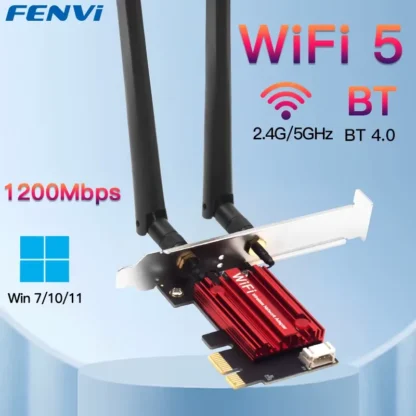

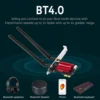



FENVI WiFi 5 PCI-E Wireless Adapter AC1200 Dual Band Network Card with Bluetooth 4.2

📶
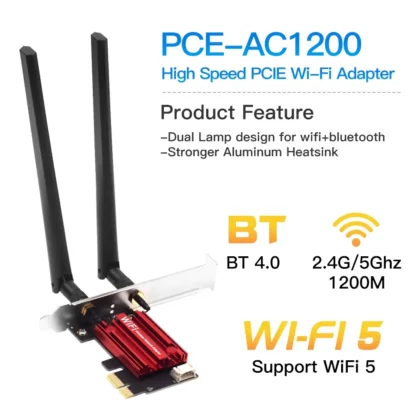
AC1200 WiFi 5FENVI WiFi 5 PCI-E Wireless Adapter
✅
2.4G & 5G Wi-FiDual-band frequency support
📦
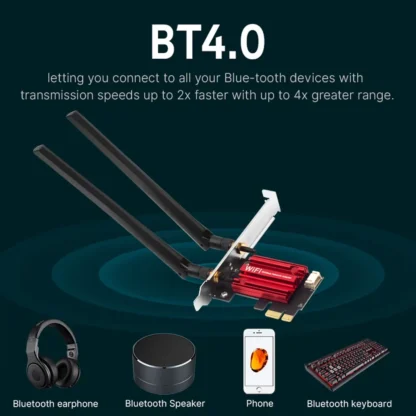
Bluetooth 4.2Bluetooth protocol included
💻
Desktop ApplicationDesigned for desktop systems
💡
1200M Wireless RateSpecified wireless transmission rate
🔌
PCI Express InterfaceInternal PCI-E adapter socket
Free Delivery
Arrives: 1 Dec – 3 Dec
Cart
In Stock
Online Store
GuestCheckout
GuestCheckout
Total Price
£9.99
GuestCheckout
SECURE PAYMENT OPTIONS
PayPalPay Later
KlarnaPay in 3
Clearpay4 Payments
VisaDebit
Mastercard
ApplePay
GooglePay
SamsungPay
Shop With Confidence
300+ Customers
14-day returns
Fast WiFi for Desktop PCs
Dual-band speed with Bluetooth connectivity
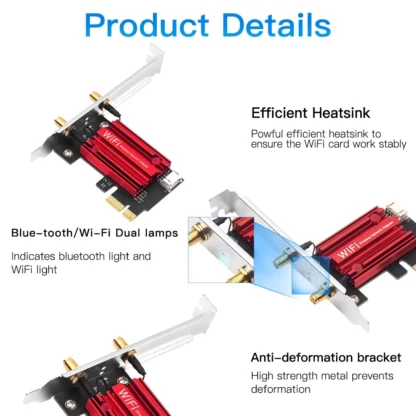
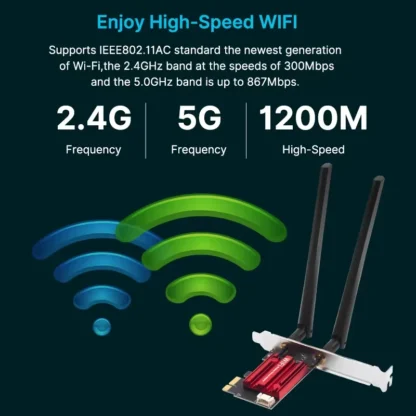
Upgrade a compatible desktop PC with reliable wireless networking and Bluetooth connectivity. This dual-band WiFi adapter supports both 2.4GHz and 5GHz connections, delivering up to 1200Mbps when used with a router operating at 80MHz. Rated speeds reach up to 867Mbps on 5GHz and 300Mbps on 2.4GHz, giving you flexible coverage for everyday browsing, streaming and downloads. The internal card fits PCIe x1, x4, x8 and x16 slots for a clean installation without external networking hardware. It also supports MU-MIMO and separate WiFi and Bluetooth functions. Designed as a Windows 11 WiFi card, it also works with 64-bit Windows 7, Windows 8 and Windows 10 after the appropriate FENVI drivers are installed.

Key Features

  • Dual-Band WiFi: Connect through either the 2.4GHz or 5GHz frequency band.
  • Up to 1200Mbps: Reaches up to 867Mbps on 5GHz and 300Mbps on 2.4GHz.
  • Bluetooth Connectivity: Supports Bluetooth for pairing compatible wireless devices.
  • Flexible PCIe Fit: Compatible with PCIe x1, x4, x8 and x16 motherboard slots.
  • MU-MIMO Support: Supports MU-MIMO for compatible wireless network connections.
  • Windows Support: Works with 64-bit Windows 7, 8 and 10, plus Windows 11.
Fast WiFi for Desktop PCs Fast WiFi for Desktop PCs
Fast WiFi for Desktop PCs

Item Specifics

Brand: FENVI
Model: WIFI 5 AC1200
Application: Desktop computers
Adapter Type: Internal wireless adapter
Interface: PCI Express
Compatible PCIe Slots: PCIe x1, x4, x8 and x16
Frequency Bands: 2.4GHz and 5GHz
Maximum Wireless Speed: Up to 1200Mbps
5GHz Speed: Up to 867Mbps
2.4GHz Speed: Up to 300Mbps
Wireless Protocols: 802.11n, 802.11a/g and 802.11ac
Bluetooth Protocol: Bluetooth 4.2
MU-MIMO: Supported
Operating Systems: 64-bit Windows 7, 8 and 10, plus Windows 11
AMD Motherboard Support: Not supported
Linux Support: No Linux driver service provided
Certification: CE
Length: 17cm
Heat Dissipation: Supported
Package Included: Yes

How to Use

How to use
1
Install the Card: Turn off the desktop PC and fit the adapter securely into a compatible PCIe x1, x4, x8 or x16 slot.
2
Connect Bluetooth Cable: Connect the included black 9-pin USB cable to a motherboard USB 2.0 header and its white end to the adapter.
3
Install Both Drivers: Download and install the separate WiFi and Bluetooth drivers from the official FENVI driver page.
4
Restart and Connect: Restart the PC, then test the WiFi connection and pair any compatible Bluetooth devices.

Important Note

A router operating at 80MHz is required to reach the stated speed of up to 1200Mbps. The supplier states that AMD chipset motherboards and Linux are not supported. WiFi and Bluetooth require separate drivers, and Bluetooth also requires the included cable to be connected to a motherboard USB 2.0 header.

Care instructions

Care Instructions

  • Switch off and disconnect the desktop PC before installing or adjusting the internal adapter.
  • Keep the adapter correctly seated in its PCIe slot and avoid handling its contacts unnecessarily.
  • Use the official FENVI drivers and restart the computer after driver installation.

Perfect For

Desktop WiFi Upgrades

Add wireless networking to a compatible desktop computer with an available PCIe slot.

Dual-Band Networks

Connect to compatible 2.4GHz or 5GHz wireless networks.

Bluetooth Accessories

Pair compatible Bluetooth devices after connecting the cable and installing the driver.

Windows PCs

Use with supported 64-bit Windows 7, 8 or 10 systems and Windows 11.

Internal Installations

Keep networking hardware integrated inside the desktop instead of using an external adapter.

Frequently Asked Questions

Does this adapter work with AMD chipset motherboards?

No. The supplier states that AMD chipset motherboards are not supported and recommends contacting customer service for help.

Does it support Linux?

No Linux driver service is provided. The listed driver support covers Windows 7, Windows 10 and Windows 11, with Windows 8 also listed under supported operating systems.

Does it support both WiFi and Bluetooth?

Yes. WiFi and Bluetooth are both supported, but their drivers are separate and both must be installed.

What should I do if Bluetooth does not work?

Connect the included black 9-pin USB cable to the motherboard's 9-pin USB 2.0 header, connect the white end to the adapter, then install the Bluetooth driver.

Where can I download the drivers?

Download the drivers from the official FENVI page at https://www.fenvi.com/drive.html?keyword=AC1200M, install them, restart the PC and test the adapter.

Which PCIe slots are compatible?

The adapter is listed as compatible with PCIe x1, x4, x8 and x16 slots on supported motherboards.

Real customer feedback

Customer Reviews

☆☆☆☆☆

No reviews yet

Be the first customer to share your experience with this product.

Only signed-in customers who purchased this product may leave a review.

Product details

Product compliance information

Manufacturer information
Name:Shenzhen Fenvi Technology Co., LTD
Address:CN-401 North Block, Beier Road,Hi-tech Industrial Park, Bantian Subdistrict, Longgang District, Shenzhen,Guangdong Province
Email:sale@fenvi.com
Phone:075583628485

EU responsible person information
Name:E-CrossStu GmbH
Address:Mainzer Landstr.69,60329 Frankfurt am Main,Hessen,Deutschland,Germany
Email:E-CrossStu@web.de
Phone:69332967674